Secret management
GitOps workflows use Git as the single source of truth for application configurations. Storing sensitive data such as credentials, API keys, and secrets directly in Git repositories poses security risks.
PipeCD’s secret management feature allows you to store encrypted secrets in your Git repository alongside application manifests. The encrypted secrets are decrypted by piped during deployment operations.
Prerequisites
Before using this feature, piped needs to be started with a key pair for secret encryption.
You can use the following command to generate a key pair:
openssl genpkey -algorithm RSA -pkeyopt rsa_keygen_bits:2048 -out private-key
openssl pkey -in private-key -pubout -out public-key
Then specify them while installing piped with these options:
--set-file secret.data.secret-public-key=PATH_TO_PUBLIC_KEY_FILE \
--set-file secret.data.secret-private-key=PATH_TO_PRIVATE_KEY_FILE
Finally, enable this feature in the piped configuration file with the secretManagement field as below:
apiVersion: pipecd.dev/v1beta1
kind: Piped
spec:
  pipedID: your-piped-id
  ...
  secretManagement:
    type: KEY_PAIR
    config:
      privateKeyFile: /etc/piped-secret/secret-private-key
      publicKeyFile: /etc/piped-secret/secret-public-key
How it works
The secret management workflow is as follows:
- Encrypt secret data using PipeCD’s Web UI and store the encrypted data in Git
pipedautomatically decrypts the encrypted secrets before performing deployment tasks
Encrypting secret data
To encrypt secret data, navigate to the Applications page and click the “Encrypt Secret” button located in the top-left corner. Then, select a piped from the dropdown list, enter your secret data, and click the “ENCRYPT” button.
Copy the encrypted data to store in Git.
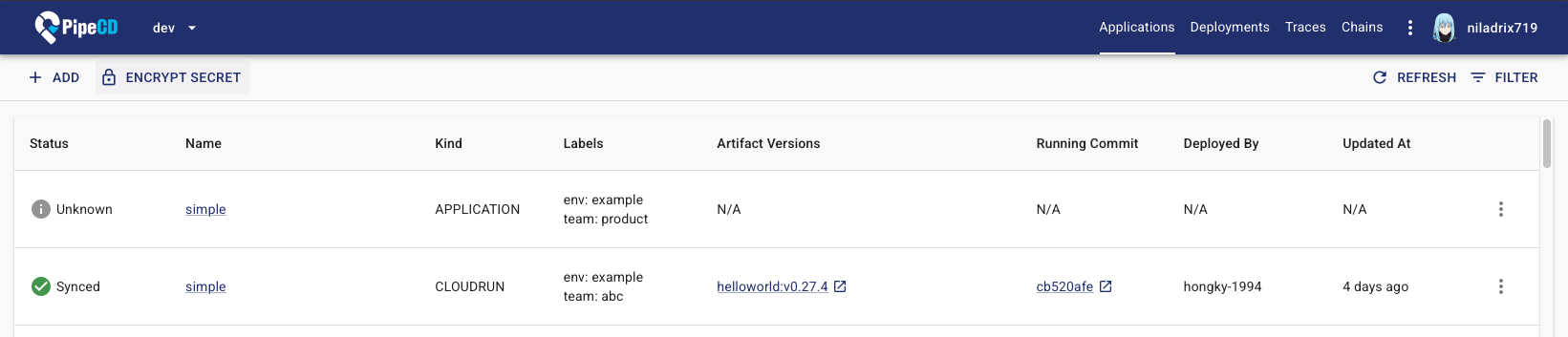
Applications page
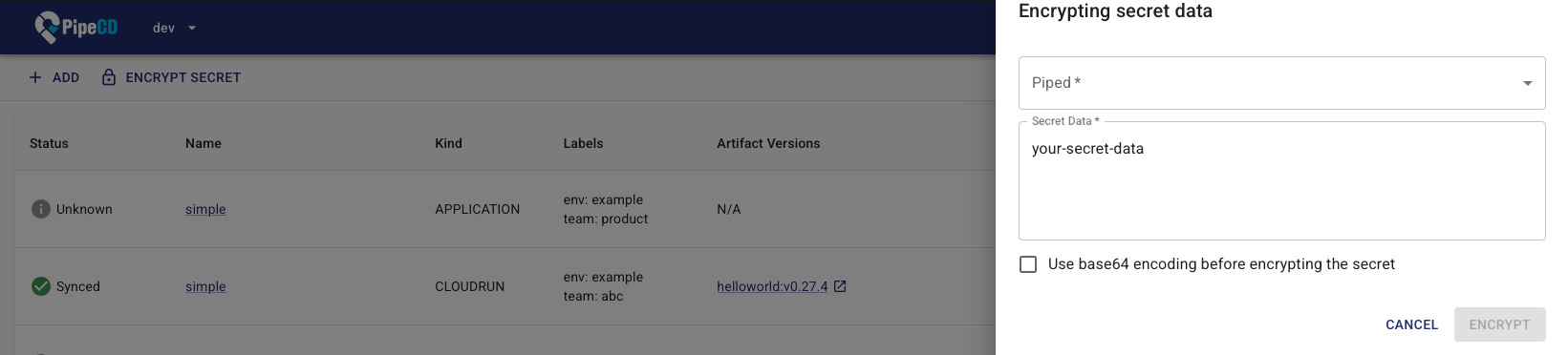
The form for encrypting secret data
Storing encrypted secrets in Git
To make encrypted secrets available to an application, specify them in the application configuration file.
encryptedSecretscontains a list of the encrypted secrets.decryptionTargetscontains a list of files that use one of the encrypted secrets and should be decrypted bypiped.
apiVersion: pipecd.dev/v1beta1
# One of piped defined app, for example: using the Kubernetes plugin
kind: Application
spec:
  encryption:
    encryptedSecrets:
      password: encrypted-data
    decryptionTargets:
      - secret.yaml
Accessing encrypted secrets
Any file in the application directory can use the .encryptedSecrets context to access secrets you have encrypted and stored in the application configuration.
For example:
- Accessing by a Kubernetes Secret manifest
apiVersion: v1
kind: Secret
metadata:
  name: simple-sealed-secret
data:
  password: "{{ .encryptedSecrets.password }}"
In all cases, piped decrypts the encrypted secrets and renders the decryption target files before using them to handle any deployment tasks.
Feedback
Was this page helpful?
Glad to hear it! Please tell us how we can improve.
Sorry to hear that. Please tell us how we can improve.
