Rolling back a deployment
Rollbacks allow you to revert your application to a previous stable state when something goes wrong during deployment. PipeCD supports both automatic and manual rollbacks, giving you flexibility in handling deployment failures.
Automatic rollback
You can automate rollbacks by enabling the autoRollback field in your application configuration:
spec:
  pipeline:
    stages:
      - name: K8S_CANARY_ROLLOUT
      - name: K8S_PRIMARY_ROLLOUT
  autoRollback: true
When autoRollback is enabled, the deployment will be rolled back if any of the following conditions are met:
- A deployment pipeline stage fails
- An analysis stage determines that the deployment has a negative impact
- An error occurs while deploying
If a rollback is triggered, PipeCD adds a new ROLLBACK stage to the deployment pipeline and reverts all applied changes.
Manual rollback
If you need to roll back a deployment that has already completed, or want to intervene during a deployment which is in-progress, you can trigger a rollback manually from the Web UI. See cancelling a deployment for details on how to cancel a deployment with rollback.
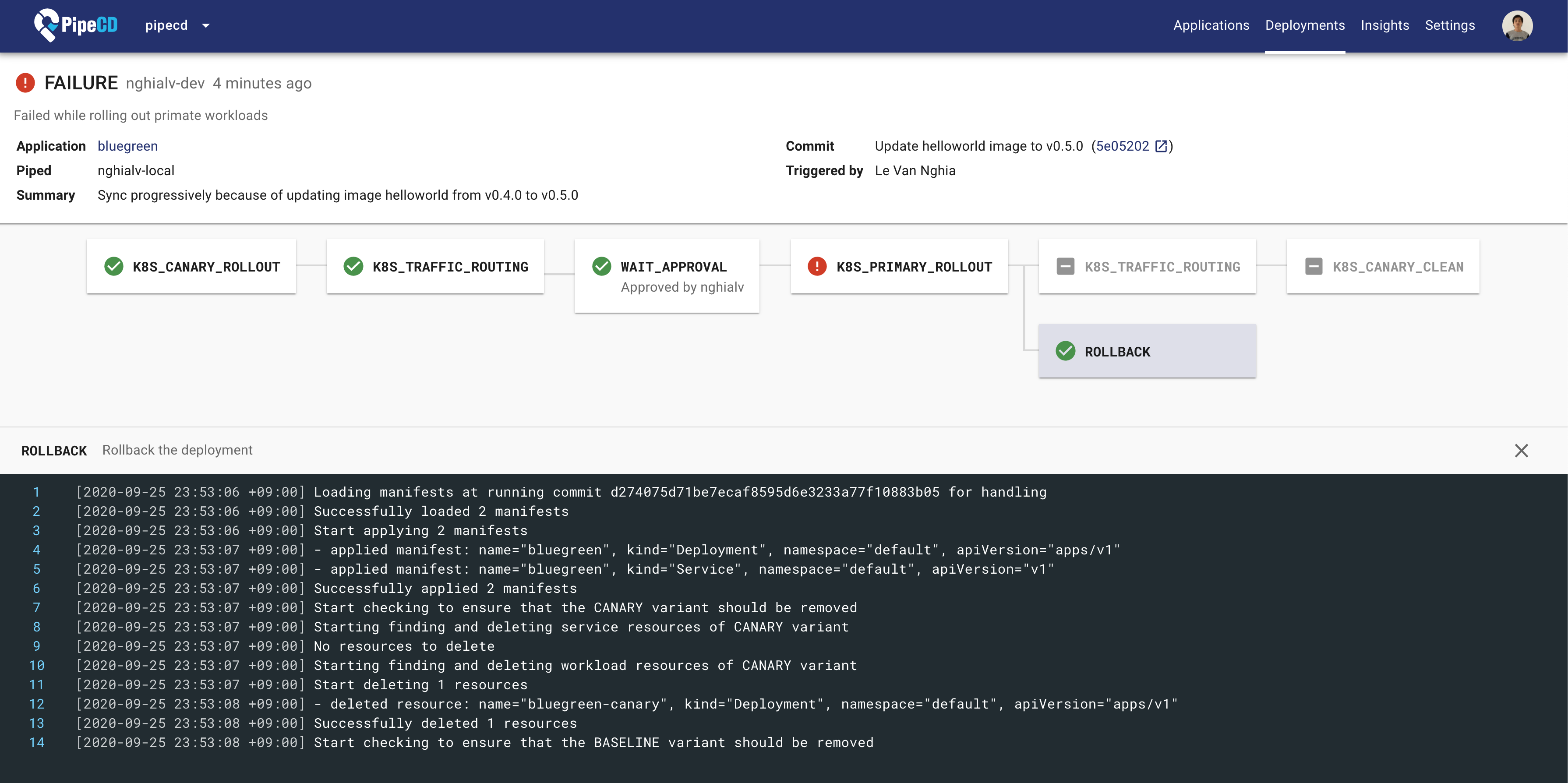
A deployment being rolled back
Feedback
Was this page helpful?
Glad to hear it! Please tell us how we can improve.
Sorry to hear that. Please tell us how we can improve.
