Configuration drift detection
Configuration drift occurs when running resources diverge from their definitions in Git, typically due to manual ad-hoc changes or direct updates to the cluster.
Since PipeCD uses Git as the single source of truth, all application and infrastructure changes should go through pull requests. When drift occurs, developers need to be notified so they can reconcile the differences. PipeCD’s configuration drift detection feature helps you identify these discrepancies. It periodically compares your running resources against the definitions in Git and:
- Displays the comparison results on the application details page
- Sends notifications to developers when drift is detected
Enabling Configuration drift detection
Configuration drift detection is enabled by default for all applications. You can adjust the interval for how frequently PipeCD compares running resources against Git definitions in your Piped configuration. To customize notifications for drift events, see Configuring notifications.
Ignoring drift detection for specific fields
Note: This feature is currently supported only for Kubernetes Applications.
You can also ignore drift detection for specified fields in your application manifests. In other words, even if the selected fields have different values between live state and Git, the application status will not be set to Out of Sync.
Suppose you have the application manifest:
apiVersion: apps/v1
kind: Deployment
metadata:
  name: simple
spec:
  replicas: 2
  template:
    spec:
      containers:
        - args:
            - hi
            - hello
          image: gcr.io/pipecd/helloworld:v1.0.0
          name: helloworld
And you want to ignore the drift detection for these two fields:
- pod’s replicas
helloworldcontainer’s args
You can add the following statements to app.pipecd.yaml:
spec:
  ...
  driftDetection:
    ignoreFields:
      - apps/v1:Deployment:default:simple#spec.replicas
      - apps/v1:Deployment:default:simple#spec.template.spec.containers.0.args
Note:
ignoreFieldsis in the formatapiVersion:kind:namespace:name#yamlFieldPath
Detection results
Drift detection reports one of three statuses: SYNCED, OUT_OF_SYNC, or DEPLOYING.
SYNCED
No drift detected. All running resources match their Git definitions. The application details page displays a green “Synced” mark.

Application in SYNCED state
OUT_OF_SYNC
Drift detected. An application enters this status when any of the following is true:
- A resource is defined in Git but not running in the cluster
- A resource is running in the cluster but not defined in Git
- A resource exists in both but with differing configurations
The application details page displays a red “Out of Sync” mark.

Application in OUT_OF_SYNC state
Click Show Details to see what caused the drift. In the example below, a Deployment’s replica count is 300 in Git but 3 in the cluster.
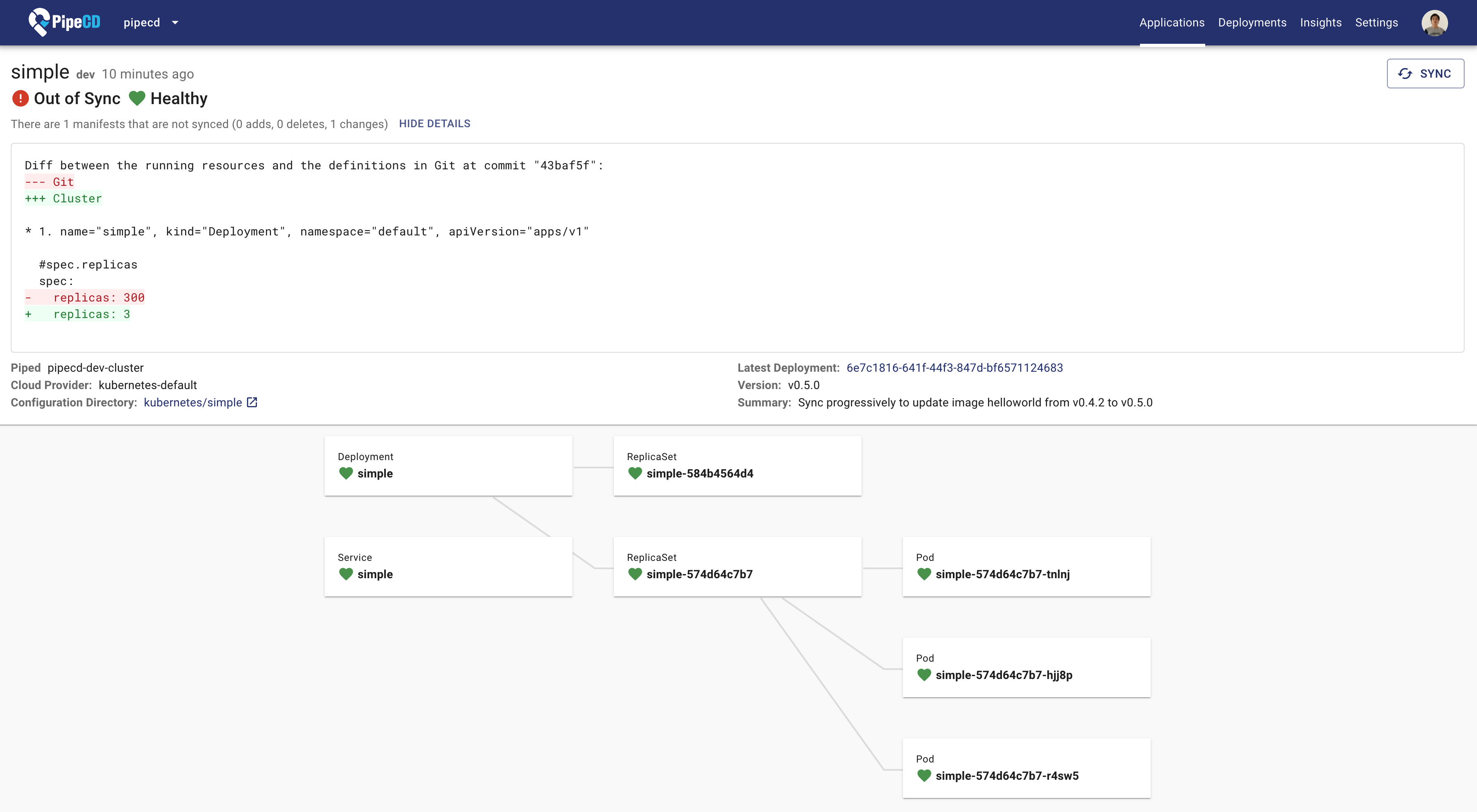
Details showing why the application is OUT_OF_SYNC
DEPLOYING
Deployment in progress. PipeCD pauses drift detection while a deployment is running and resumes it once the deployment completes.
For more information, see the configuration reference.
Feedback
Was this page helpful?
Glad to hear it! Please tell us how we can improve.
Sorry to hear that. Please tell us how we can improve.
