Cancelling a deployment
Learn how to cancel a running deployment using the Control Plane.
A running deployment can be cancelled from web UI at the deployment details page.
Canceling a Deployment
When you cancel an active deployment, PipeCD can automatically execute a rollback to the previous stable version if rollback is enabled in your application configuration.
Rollback Options
You have two ways to control rollback behavior when canceling a deployment:
-
Automatic Rollback: If enabled in the application configuration, rollback executes automatically after cancellation.
-
Manual Selection: Click the dropdown arrow (
▼) next to theCANCELbutton in the web UI to explicitly choose whether to rollback or not.
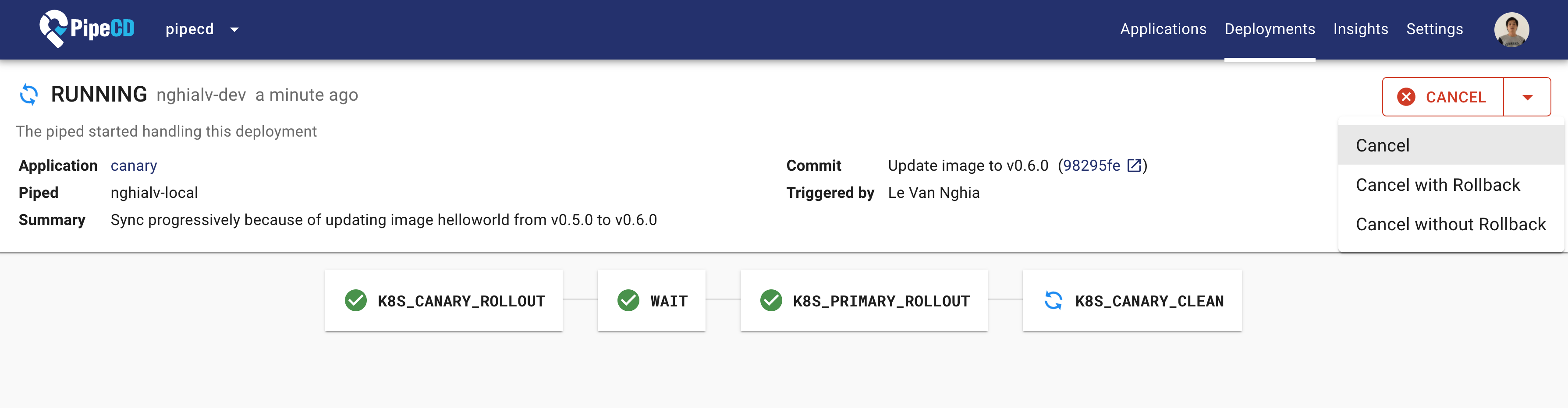
Cancel a Deployment from web UI
Feedback
Was this page helpful?
Glad to hear it! Please tell us how we can improve.
Sorry to hear that. Please tell us how we can improve.
Last modified December 22, 2025: ADD app-livestate, cancelling-deployment (#6378) (44a107443)
