Concepts
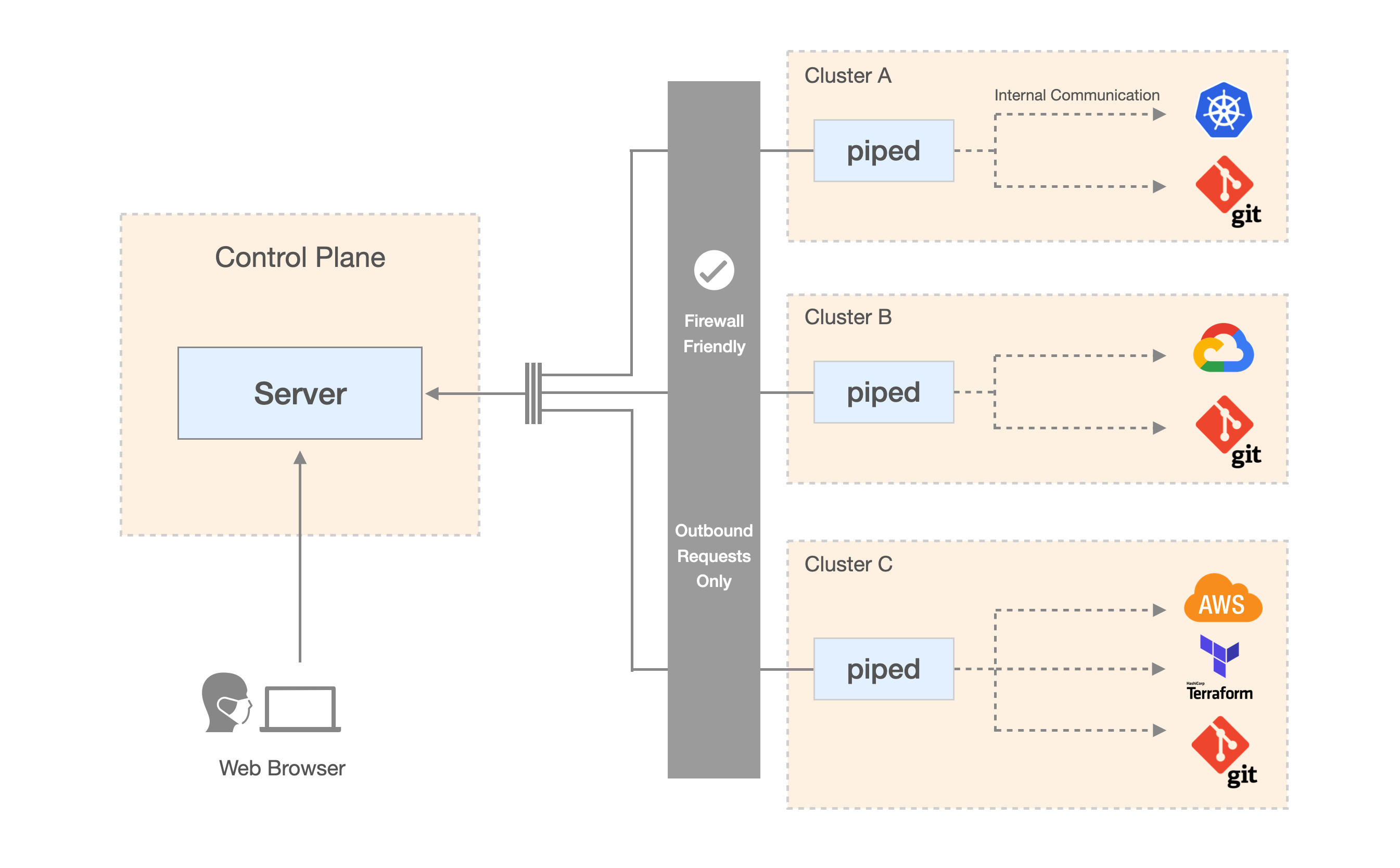
Component Architecture
Control Plane
The Control Plane is the centralized management service of PipeCD. It coordinates all activities between users, projects, and piped instances.
The Control Plane remains the backbone of the system but is now fully plugin-aware. Instead of directly handling deployment logic for specific platforms, it interacts with piped agents that run plugin binaries, allowing the Control Plane to manage deployments across any platform supported by plugins.
For more detailed information about Control Plane architecture and components, see Architecture overview of Control Plane.
piped
piped is a binary, agent component responsible for executing deployments in PipeCD. piped now adopts plugin-based architecture, transforming from a single-purpose executor into a lightweight runtime capable of running any deployment logic defined by plugins. The piped component is designed to be stateless.
Plugins
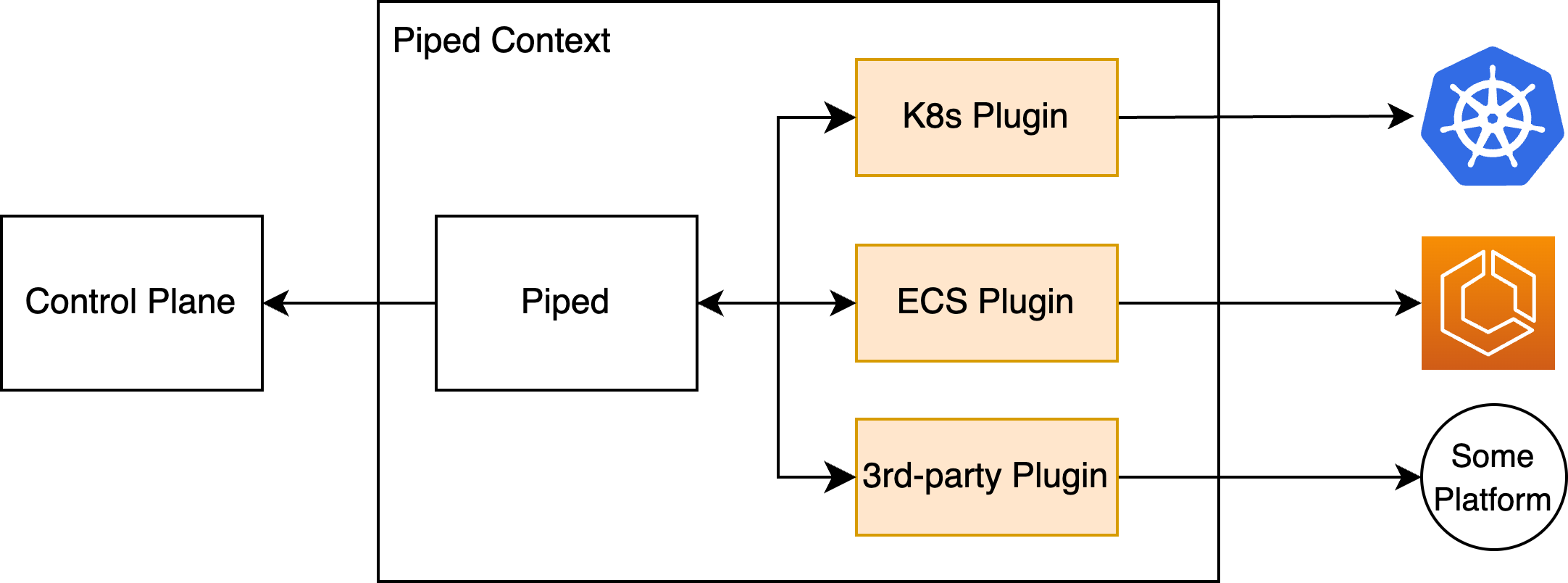
PipeCD v1 Plugin Architecture
Plugins replace the concept of Platform Providers (also called Cloud Providers) from earlier versions of PipeCD.
A Plugin defines how and where deployments are executed. Each plugin encapsulates the logic required to interact with a specific platform or tool - for example, Kubernetes, Terraform, or ECS.
In this architecture, plugins are the actors who execute deployments on behalf of piped. Rather than containing built-in logic for every platform, piped now loads plugin binaries at startup and communicates with them over gRPC. This design allows support for new or custom platforms.
Note:
Check out the PipeCD Community Plugins repository to browse available plugins and learn how to create your own.
Project
A Project is a logical group of applications managed together by a team of users.
Each project can connect to multiple piped instances running across different environments or clouds.
Projects use role-based access control (RBAC) to manage permissions:
- Viewer – can view applications and deployments within the project.
- Editor – includes Viewer permissions and can perform actions that modify state, such as triggering or cancelling deployments.
- Admin – includes Editor permissions and can manage project settings, members, and associated
pipedinstances.
Application
An Application represents a collection of declarative resources and configurations that represent a deployable unit managed by PipeCD.
Applications are no longer tied to a specific platform or technology such as Kubernetes, Terraform, or ECS. Instead, they are platform-agnostic objects whose deployment behavior is determined dynamically through Plugins.
Application Configuration
A declarative YAML file that defines how an application is managed by PipeCD.
It specifies metadata, labels, and the deployment logic that piped executes through plugins.
Each application has one configuration file stored in its Git directory, typically named app.pipecd.yaml.
Application Directory
A directory in the Git repository that contains the application’s configuration file and related manifests. This directory represents the source of truth for the application’s desired state.
Deployment
A Deployment is the process of bringing an application’s live state in line with its desired state defined in Git. When a deployment completes successfully, the running environment matches the configuration from the target Git commit.
Sync Strategy
PipeCD provides 3 different ways to keep your application’s live state consistent with its desired state stored in Git. Depending on your deployment workflow, you can choose from one of the following sync strategies:
-
Quick Sync: A fast, single-step method to sync your deployment with the desired state. PipeCD automatically generates a pipeline composed of predefined Quick Sync stages provided by plugins linked to the application. Quick Sync is generally used when you need to rapidly apply configuration changes without a gradual rollout.
-
Pipeline Sync: A customizable, step-by-step sync process that follows the pipeline you define in your application configuration file. Use Pipeline Sync when you need more control over how updates are rolled out.
-
Auto Sync: When you trigger a sync without specifying a strategy,
pipedautomatically selects the most appropriate method based on your application configuration.
Feedback
Was this page helpful?
Glad to hear it! Please tell us how we can improve.
Sorry to hear that. Please tell us how we can improve.
